A calculator bought too early stays in the school bag, and one that is too basic stops a pupil at the first statistics lesson. The right model depends on the level, the stream and what the teacher or the exam allows. This guide explains what to read on a product sheet and which model fits each stage, from primary school to university, then the office.
First: check what is allowed
Rules change from one school to another and from one exam to another. Some ban programmable models, others require one specific model for the whole class. Before buying, read the supply list, ask the maths teacher or check the official exam notice. This guide does not replace that check.
A simple rule: if the list names an exact model, buy that one. The whole class then has the same keys and the teacher can show each step once.
Features to read on the product sheet
Number of functions
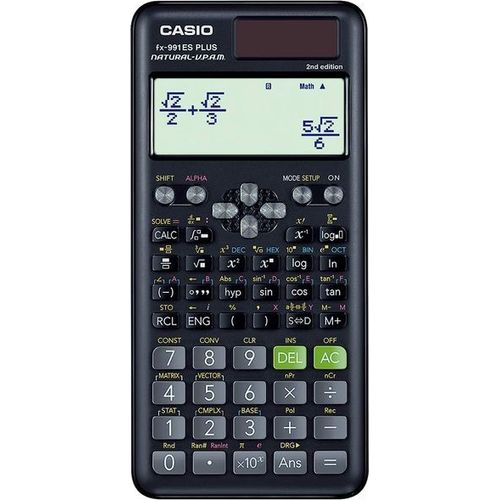
The figure (240, 417, 552) counts every operation available, from the common to the rare. It tells you the range, not how easy the calculator is. A collège pupil will use only a small part of the 417 functions of an fx-991ES PLUS. What matters is that the functions the syllabus needs are there: fractions, powers, trigonometry, statistics, then equations and matrices later.
Natural display
Casio calls it Natural Textbook Display. Fractions are written with a bar and roots with their symbol, as in the textbook. The answer can stay in exact form (3/4, √2) instead of a rounded decimal. For a pupil learning fractions and roots, this is the most useful feature.
Two-line models such as the fx-82MS 2nd edition show the input and the result, but the input is a single line of text. They still work well, you just need to type brackets more carefully.
Fractions and statistics
The fraction key lets you enter a fraction, simplify it and convert it to a decimal. Statistics mode calculates the mean, the standard deviation and, on fuller models, regressions from a table of values. Both are used from collège to lycée, and statistics come back at university in economics and management.
Display digits
On a scientific calculator, 10 + 2 means 10 digits for the number and 2 for the exponent of the power of 10. On a desk calculator you will see 10 or 12 digits: 12 digits show amounts up to 999,999,999,999 without cutting them.

Solar, battery or both
Most models in the shop have dual power: a solar cell above the screen and a backup button cell (often an LR44). In a dim classroom the battery takes over, and the cell saves it the rest of the time.
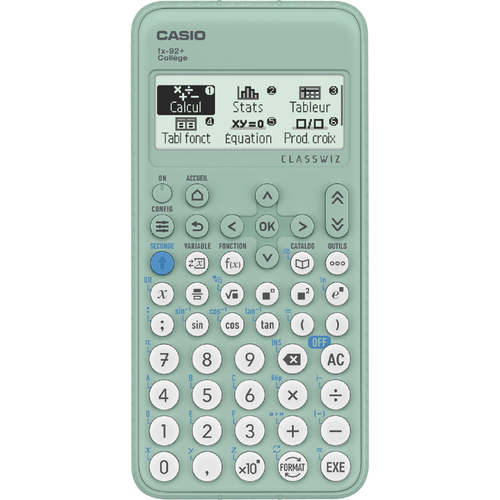
Battery-only models, such as the fx-92+ Collège which runs on one AAA battery, do not depend on light. AAA batteries are sold everywhere. Keep a spare in the pencil case on test days.
Which model for which level
Primary school
In primary school children first learn to calculate by hand. A calculator is only used in the last years, if the teacher asks for one. The Casio FX Junior+ designed for CM1 and CM2 handles fractions, Euclidean division (quotient and remainder), durations in hours, minutes and seconds, and follows the order of operations. It sits in the primary scientific calculator section.
Collège
Collège brings longer fractions, powers, roots and trigonometry. The Casio fx-92+ Collège has natural display, fractions, statistics and block programming. The Casio fx-82ES PLUS, in black, blue or pink, is the other common choice. The models are grouped under collège scientific calculators.
Lycée: common core, sciences and maths
In the science streams, and above all in sciences mathématiques, exercises call for equations, complex numbers, integrals and two-variable statistics. A collège calculator soon reaches its limits. The Casio fx-991ES PLUS combines 417 functions, natural display and dual power, with integrals, matrices and complex numbers. It also comes in blue and pink. The full selection is under lycée scientific calculators.
For a pupil in a literary or economics stream, an fx-82ES PLUS or an fx-82MS is often enough. Again, the teacher’s list decides.
University and preparatory classes
In engineering, science or economics, the Casio fx-991EX ClassWiz with 552 functions adds a 192 x 63 pixel high-resolution screen, a built-in spreadsheet, matrices up to 4x4 and equation solving with up to 4 unknowns. The spreadsheet helps in statistics: you enter a series in a column and calculate on it. Suitable models are under university scientific calculators.
Desk calculators
A desk calculator does no trigonometry, but it works through amounts quickly. Keys to look for: TAX+ and TAX− to add or remove VAT, MU for profit margin, GT for the grand total of several calculations, and the MC, MR, M+, M− memory keys.
- 10 digits: a small format for a counter or a drawer, such as the Casio MS-7UC or the SL-1000SC with thousands separators.
- 12 digits: accounting and large amounts, such as the Casio GX-12B with decimal and rounding settings, or the Deli DL-2137 and 1654C.
- Printing calculator: it keeps a paper record of every operation. The Casio FR-2650RC prints in black and red, and its Check and Correct function lets you review 150 steps.
The full range is under desk calculators.

Summary table
| Level | What to check | Examples in the shop |
|---|---|---|
| Primary (last years) | Fractions, division with remainder, durations | Casio FX Junior+ |
| Collège | Natural display, fractions, powers, trigonometry | Casio fx-92+ Collège, fx-82ES PLUS |
| Lycée, science streams | Equations, complex numbers, integrals, statistics | Casio fx-991ES PLUS |
| University | Matrices, spreadsheet, high-resolution screen | Casio fx-991EX ClassWiz |
| Office | 10 or 12 digits, TAX, MU, GT, printing | Casio GX-12B, FR-2650RC |
Common mistakes
- Buying the most advanced model for collège: the pupil gets lost in the menus and the model is not always accepted in tests.
- Switching models just before an exam: keys and menus differ, and it takes time to adjust.
- Forgetting the angle unit: a calculation in degrees done on a machine set to radians gives a wrong answer with no error message.
- Throwing away the manual: it explains how to reset the calculator when a setting gets stuck.
Our advice
- CM1 and CM2: the FX Junior+, only if the teacher asks for it.
- Collège: an fx-92+ Collège or an fx-82ES PLUS, according to the school list.
- Lycée sciences and maths: an fx-991ES PLUS, which covers the equations, complex numbers and integrals of the syllabus.
- Science at university: an fx-991EX ClassWiz for matrices and the spreadsheet.
- Retail and accounting: a 12-digit model with TAX and MU, or a printing model if you need a record.
In every case, check with the school or in the exam rules which model is allowed, then choose from the shop’s calculators.